- January 19, 2026
- operant_user
Avaya IP Office Conference Bridge: Bring Secure Audio Meetings In-House
In most organizations today, meetings don’t just happen in boardrooms—they happen on audio bridges. Sales huddles, weekly reviews, customer updates, vendor calls, everything runs on conference calls.
If you’re still paying monthly for external audio-conferencing services or juggling multiple dial-in numbers and apps, it’s time to look at the built-in Avaya IP Office Conference Bridge.
Avaya IP Office provides a secure, scalable, in-house audio conference bridge that runs on the same platform you already use for telephony. No extra portals, no separate provider contracts—just one powerful system that handles both day-to-day calling and multi-party conferencing.
What Is the Avaya IP Office Conference Bridge?
A conference bridge is a virtual meeting room where multiple callers dial in and communicate synchronously, instead of connecting various point-to-point calls.
With Avaya IP Office, this bridge is built directly into the IP Office platform, so you don’t need a separate conferencing service. The system provides:
- Built-in audio conference ports (number of simultaneous participants depends on edition)
- “Meet-Me” conference rooms with dial-in numbers and secure PINs
- Ad-hoc conferences started from any supported Avaya desk phone or soft client
- Optional recording of conference calls for later review or compliance
Because the bridge is integrated, users can set up and manage conferences directly from Avaya IP Office phones, one-X Portal, User Portal, or Voicemail Pro workflows, depending on your deployment.
Conference Capacity: How Many People Can Join?
Exact capacity depends on your Avaya IP Office edition and hardware resources (DSP, VCM, trunk channels, etc.), but Avaya provides clear reference configurations:
IP Office Essential / Preferred Edition
- Supports a built-in multi-party audio conference bridge, commonly up to 128 parties with 64 participants per individual conference in current solution descriptions (subject to license and resources).
IP Office Select / Server Edition
- Designed for larger mid-enterprise setups, with hundreds of conference ports. For example, IP Office Select documentation highlights up to 512 conference bridge ports in certain configurations, ideal for larger teams and multi-site deployments.
Pro Tip for IT Teams:
Don’t just look at “party count”—also check trunk capacity, voicemail channels, and DSP resources to ensure you have enough media channels for peak conference usage.
Key Features of the Avaya IP Office Conference Bridge
Ad-Hoc Conferencing from Any Phone
Sometimes you’re on a live call and suddenly realize you need your manager, pre-sales engineer, or vendor on the line.
Avaya makes it simple:
- Put the existing call on hold
- Dial the next participant
- Use “Conference Add” / soft key to merge the calls into a multi-party conference
No need to schedule anything in advance—instant collaboration, directly from your Avaya J-Series or digital phone.
Meet-Me Conferences with PIN Security
For planned meetings and external participants, Avaya supports Meet-Me Conferencing:
- The admin/IT team configures one or more conference bridge numbers.
- You can assign unique PIN codes to protect each room.
- Participants dial the access number, enter the PIN, and join the room.
Perfect for:
- Weekly team meetings
- Partner and vendor calls
- Customer review sessions or advisory boards
- Project stand-ups with remote teams
Because the bridge is on-premises, sensitive discussions stay inside your organization’s environment.
Professional Conference Controls for Hosts
Depending on your Avaya IP Office licenses and clients (Power User, Office Worker, Receptionist, one-X Portal, etc.), conference organizers get rich controls such as:
- View who is in the conference
- Mute specific participants
- Drop a noisy line
- Configure entry/exit tones, MOH, and customized greetings
It provides your business calls the same professional experience as enterprise-grade hosted audio bridges—without the recurring subscription.
Integrated Call Recording (Optional)
Need to record training calls, project reviews, or critical customer discussions?
With the right licensing and configuration, Avaya IP Office can record conference calls, sending audio streams to the recording destination (such as Media Manager or other recording solutions).
Typical use cases:
- Training & onboarding – record training sessions and reuse them for new hires
- Sales & pre-sales – capture complex solution discussions with customers
- Compliance – keep proof of commitments and verbal approvals where policy requires
One Platform for Telephony and Conferencing
A powerful strength of Avaya IP Office lies in its consolidation capabilities.
Instead of:
- A separate PBX
- A separate audio conference provider
- A separate collaboration portal
IP Office brings everything into a single unified platform. That means:
- Single vendor for telephony and conferencing
- Simplified support and troubleshooting
- Easier user training—same phones, same interface
- Lower total cost of ownership over the life of the system
Business Benefits for Indian Organizations
Direct Cost Savings vs External Audio Bridges
External audio-conferencing services often bill you per minute, per bridge, or per user license.
With Avaya IP Office:
- The conference bridge is built in
- Calls can ride on your existing SIP/PRI trunks
- You avoid extra per-user or per-minute audio bridge charges
For organizations that conduct multiple internal or customer calls daily, the ROI appears within months, especially when compared to hosted conference services.
Better Security and Data Control
Because the conference bridge is part of your own IP Office system, you retain more control over:
- Audio Traffic Routing
- Dial-In Access Control
- Secure PIN and Access Control
- Whether recordings are stored locally or centrally
Essential for BFSI, healthcare, manufacturing, and government environments where compliance and privacy take precedence.
Simpler User Experience for Non-Technical Staff
Your employees don’t want more apps—they want calls to “just work”.
With Avaya IP Office Conference Bridge:
- Users dial one familiar internal number
- They use short codes, phone buttons, or the one-X Portal to launch or join a conference
- Receptionists and supervisors can assist from the Soft Console or web tools
Less confusion means higher adoption and fewer support tickets.
Future-Ready: Integrate with Mobility, SIP, and UC
As your organization moves towards:
- SIP trunks
- softphones
- remote workers
- mobile clients
With Avaya IP Office, users can join conferences effortlessly from desk phones, laptops, or mobiles, enjoying a unified experience governed by consistent enterprise policies.
Typical Use Cases We See with Avaya IP Office Conference Bridge
From our experience as an IP telephony and contact center solutions provider, some of the most common use cases include:
Management Review Meetings
Monthly sales, finance, or operations review calls with regional heads, all joining a single secure bridge.
Customer & Vendor Review Calls
Recurring check-ins with key accounts or suppliers—using branded dial-in numbers and PINs.
Project & Implementation War Rooms
Cross-functional project teams, including IT, Tech, Operations, OEMs, and Client, use one bridge throughout the rollout phase.
Training & Onboarding Sessions
HR and L&D teams conduct audio-based training and refresher programs, with sessions often recorded for ongoing reference.
Emergency Coordination Calls
A dedicated emergency bridge number that key stakeholders can dial into when there’s a major incident.
How the Conference Bridge Fits into a Complete Avaya IP Office Setup
A typical Avaya IP Office deployment with conference bridge might include:
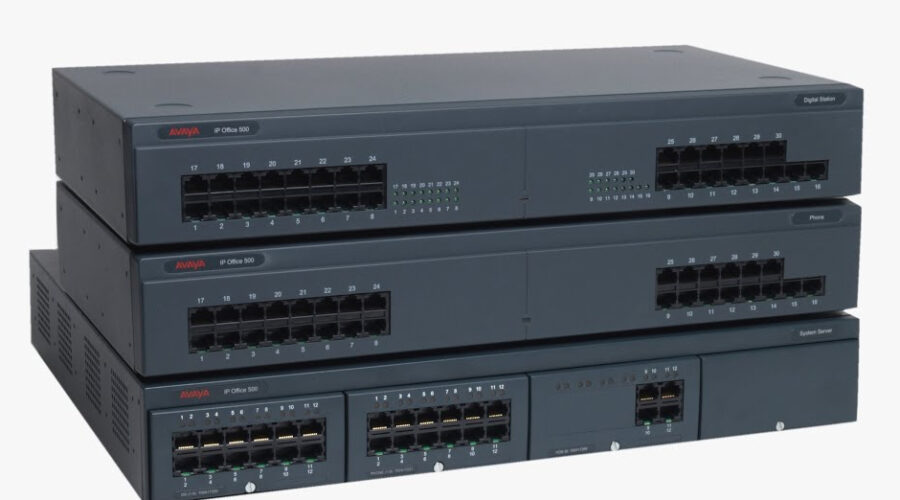
- IP500 V2 / V2A Control Unit hosting your core telephony and conference bridge
- Digital and IP station modules (e.g., Digital Station 8 / 16 / 30) for user phones
- Voicemail Pro / Preferred Edition for Meet-Me workflows, PIN prompts, and advanced routing
- SIP / PRI trunk modules for external connectivity
- J-Series IP phones, B-Series conference phones, soft clients, and one-X Portal for end-user access
This ecosystem turns Avaya IP Office into a complete collaboration hub—not just a PBX.
When Should You Upgrade or Optimize Your Conference Bridge?
You should consider reviewing or upgrading your Avaya IP Office Conference Bridge if:
- Users frequently complain that “lines are full” during peak meetings
- You are paying extra for external audio conference services despite having IP Office
- You plan to increase remote or hybrid work and need more conference capacity
- Your system is on obsolete releases (pre-R10), and you want the latest security and feature set
Optimizing could mean:
- Adding more DSP / VCM resources
- Upgrading from Essential to Preferred / Select editions
- Re-designing conference dial plans and PIN policies
- Integrating with your recording or analytics tools
Why Work with Operant Infotech for Avaya IP Office Conferencing?
Operant Infotech Pvt. Ltd. is an established ICT solutions provider with deep expertise in Avaya IP Office, contact center, and IP telephony deployments across India.
With us, you get:
- End-to-end consulting – capacity planning, licensing, and solution design
- On-site and remote implementation – from base system to advanced Meet-Me workflows
- Training for your IT and end-users – so your teams can run their own conferences comfortably
- Ongoing AMC and support – proactive monitoring, patching, and upgrade guidance
Whether you’re deploying Avaya IP Office for the first time or modernizing an existing system, we can help you unlock the full value of the built-in conference bridge.
Ready to Bring Your Conference Bridge In-House
If you want to:
- Replace third-party audio bridge subscriptions
- Secure sensitive internal and customer discussions
- Simplify how your teams schedule and join conference calls
- Scale conferencing as your business grows
Then it’s time to explore Avaya IP Office Conference Bridge for your organization.
Get in touch with Operant Infotech today to schedule a consultation, capacity assessment, or live demo of Avaya IP Office Conferencing tailored to your business.